
Le bon endroit pour vos captures d’écran.

Sieva les trie, en extrait les détails et les retrouve même quand vous ne vous en souvenez qu’à moitié. Sans compte : juste votre iPhone et votre iCloud.

Pour iPhone, iPad, iPhone Duo et Mac cet automne.

Faites vos captures comme d’habitude.

Sieva trouve vos captures d’écran dans Photos, entre le chien et le coucher de soleil. Rien à partager, transférer ou importer.

Récents7 captures d’écran

Votre propre fil privé.

Chaque capture apparaît comme une publication dans un fil rien que pour vous, et une série de captures liées arrive ensemble, en un lot à faire défiler. Ajoutez aux favoris, classez, commentez, programmez un rappel ou archivez, directement depuis le fil.

Sieva

  • Favoris
  • Notes
  • Rappels
  • Événements

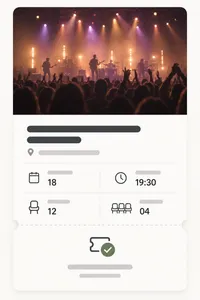
Night Garden Live

Événements1h

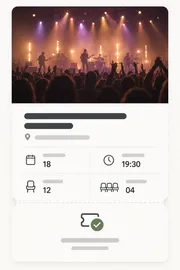
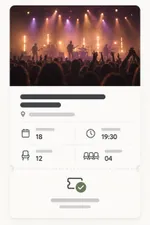
Deux billets pour Night Garden Live à la Salle du Port, samedi 18, ouverture des portes à 19 h 30.

Capture d’écran d’un billet de concert

Demander à Sam pour le deuxième billet

Escapade à la plage

Voyages5h

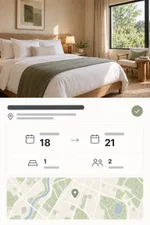
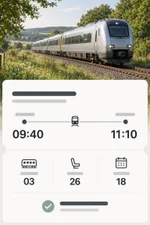
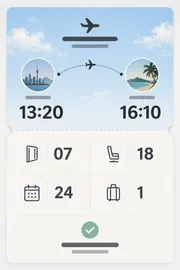
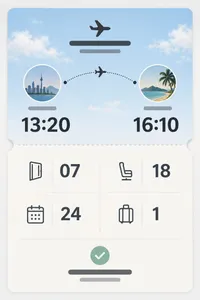
Votre vol, votre hôtel et votre billet de train pour la plage, réunis dans un même lot.
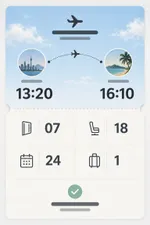
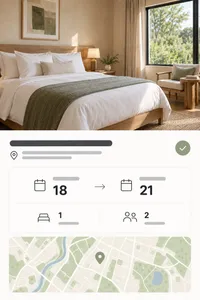
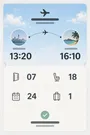
Capture d’écran d’une carte d’embarquementCapture d’écran d’une réservation d’hôtelCapture d’écran d’un billet de train

Partagez, mettez en favori, annotez.

Mettez les meilleures en favoris, dessinez dessus et partagez n’importe quelle capture en carte image soignée ou en sticker.
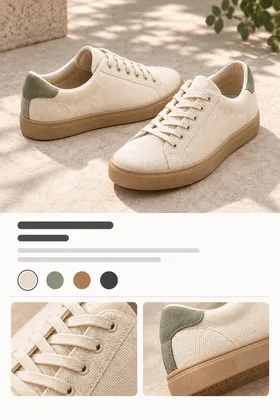
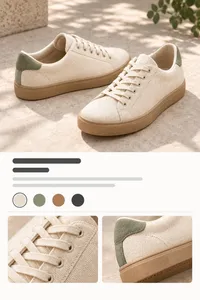
Capture d’écran d’une paire de baskets
Baskets du quotidien

Idée cadeau pour l’anniversaire de Léa

Rappels et événements, automatiquement.

Sieva repère les dates et échéances dans vos captures et en fait des rappels et des événements de calendrier, avec votre note en pièce jointe.
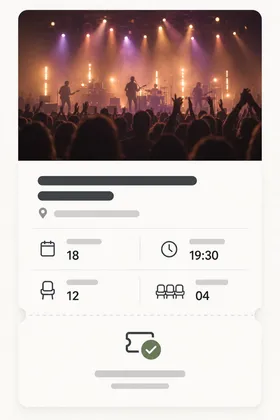
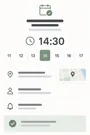
Capture d’écran d’un billet de concert

Rempoter le monstera

Pot plus grand, terreau neuf

dim. 12 oct. 10:00

Ajouter au calendrier

Night Garden Live

sam. 18 oct. · 19:30 – 22:30

Salle du Port

Ajouter

Voyez les détails, les captures liées, les couleurs et le texte.

Ouvrez une capture et voyez ce que Sieva en a tiré, avec les noms, prix, dates et lieux, les captures qui vont avec, ses couleurs et chaque mot du texte.


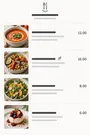
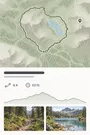
Capture d’écran d’une recette

Spaghetti tomate-citron

  • 25 min
  • Pour 2
  • Recettes

On vous aide à trier.

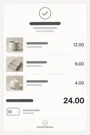
Les recettes avec les recettes, les voyages avec les voyages. Sieva les range dans des piles intelligentes, et vous pouvez aussi créer toutes les piles que vous voulez.

Piles

Mes piles

1Week-end entre filles
Créer une pile

Types intelligents

Intelligent3Événements
Intelligent4Voyages
Intelligent2Cuisine
Intelligent2Listes et tâches
Intelligent3Achats
Intelligent1Reçus

Cherchez n’importe quoi.

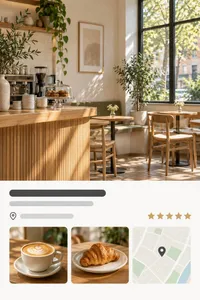
Cherchez comme vous la décririez à un ami. Sieva sait ce qu’une capture est, pas seulement ce qu’elle dit.

Faites le ménage dans votre pellicule.

Une fois l’essentiel enregistré, nettoyez les originaux de Photos par lots que vous vérifiez. Rien ne part sans votre accord.

Récents16 éléments9 éléments

Essayer la bêta

Sieva est ouvert aux tests sur TestFlight, l’app bêta d’Apple. Il vous faut un iPhone sous iOS 27.

Rejoindre sur TestFlight

Ouvrez cette page sur votre iPhone, ou installez d’abord TestFlight et touchez le lien depuis l’app.

Questions fréquentes

Qu’est-ce que Sieva ?

Sieva est un organisateur de captures d’écran pour iPhone (ainsi que pour iPad et Mac).

Il lit vos captures, essaie de comprendre « pourquoi », et garde l’essentiel : noms, prix, dates, lieux et objets.

Ensuite, vous retrouvez tout comme vous vous en souvenez.

Est-ce que Sieva utilise l’IA ?

Oui, et plus précisément Apple Intelligence, directement sur votre appareil Apple.

Aucune entreprise d’IA extérieure, et pas de compte.

Vos captures ne sont jamais lues par un tiers, et ne servent jamais à entraîner quoi que ce soit ni à vous cibler avec des publicités.

Sur quels appareils Sieva fonctionne-t-il ?

Tout iPhone sous iOS 27. L’app iPhone sort en octobre 2026.

iPad, iPhone Duo et Mac suivront cet automne.

Sieva fonctionne au mieux sur les appareils compatibles avec Apple Intelligence. Sur les iPhone plus anciens, Sieva peut utiliser Private Cloud Compute d’Apple là où il est disponible, si vous l’activez.

Mes captures d’écran sont-elles envoyées quelque part ?

Uniquement vers votre propre iCloud. Nous ne pouvons ni voir vos captures d’écran ou les données de l’app, ni y accéder.

Si vous activez Private Cloud Compute, les serveurs d’Apple aident à les lire et ne gardent rien ensuite.

Ai-je besoin d’un compte ?

Pas besoin. Ni inscription, ni connexion.

Juste votre iPhone et votre iCloud.

Combien coûte Sieva ?

C’est un abonnement, mensuel ou annuel, avec un essai gratuit pour commencer.

Avec la formule annuelle, cela revient à un peu plus de 3 $ US par mois.

Les prix varient selon les pays : consultez l’App Store pour connaître le prix chez vous.

Sieva va-t-il retirer des captures d’écran de ma photothèque ?

Seulement quand vous le décidez.

Les captures ainsi nettoyées vivront désormais dans Sieva.

En quoi Sieva est-il différent de la recherche dans Photos ?

Photos trouve les mots dans une capture d’écran et un nombre limité de types d’objets.

Sieva essaie de comprendre ce que c’est et se demande « pourquoi l’avoir gardée » : une recette, un vol, une paire de chaussures pour plus tard, etc.

Sieva se synchronise-t-il entre mes appareils ?

Oui, via votre iCloud.

Les apps iPad et Mac prévues cet automne utilisent la même bibliothèque. Si vous commencez sur iPhone dès maintenant, les apps Mac ou iPad récupéreront toutes vos captures, vos piles et le reste de vos données.

Quelles langues et quels pays Sieva prendra-t-il en charge ?

Le plus possible !

Sieva commence avec les quelque 17 langues prises en charge par Apple Intelligence.

La page App Store indiquera tous les pays au lancement.

Puis-je essayer Sieva en avant-première ?

Oui, la bêta est ouverte à tous sur TestFlight.

Touchez « Essayer la bêta » sur cette page depuis votre iPhone. Il vous faut iOS 27.

Qui est derrière Sieva ?

Primary Vector, un petit duo installé à Seattle. Nous créons des apps et des expériences grand public depuis des décennies dans de grandes entreprises, et nous avons décidé que nous préférions travailler pour nous-mêmes et créer les apps que nous avons envie de voir exister.


Privacy Policy

Effective date: October 1, 2026

Sieva is built so that your screenshots, and everything Sieva learns from them, stay yours. They live on your device and, if you choose, in your own iCloud account. We cannot see them, or any personally identifiable data about you. This policy explains the small amount of information we do handle, and how to turn off the one optional piece.

Sieva is still in development. This policy covers this website today and the app as it will ship; we will update it if anything changes before launch.

Your screenshots and what Sieva extracts from them

Sieva reads screenshots you choose to import, pulls out text and details, and organizes them. That processing happens on your iPhone. The images, the extracted text and fields, your notes, reminders, stacks, and search history are stored on your device or in your personal iCloud account, which we have no access to. They are never sent to us.

On iPhone, Automatic uses Apple’s Private Cloud Compute when available, sending screenshots, your searches and questions, and relevant text to Apple for private processing. It falls back to on-device processing. Choose Built-in Brain in Settings to keep analysis on your iPhone. Private Cloud runs under Apple’s privacy terms. We do not receive anything from it. Apple describes the guarantees Private Cloud Compute makes about user data in its security research post:

We designed Private Cloud Compute to make several guarantees about the way it handles user data:

  • A user’s device sends data to PCC for the sole, exclusive purpose of fulfilling the user’s inference request. PCC uses that data only to perform the operations requested by the user.
  • User data stays on the PCC nodes that are processing the request only until the response is returned. PCC deletes the user’s data after fulfilling the request, and no user data is retained in any form after the response is returned.
  • User data is never available to Apple — even to staff with administrative access to the production service or hardware.

Source: Apple Security Engineering and Architecture, “Private Cloud Compute: A new frontier for AI privacy in the cloud.”

Information we do not collect

Personal information. Sieva has no accounts. The app never asks for your name, email address, or any other personal detail.

Your content. No screenshots, extracted text, notes, search terms, or locations leave your device to reach us.

Ads or third-party tracking. Sieva contains no ads and no advertising or tracking SDKs.

Third-party analytics. The app uses no outside analytics or crash-reporting service. See the next section for what we do collect ourselves, and “The waitlist on this website” for the website.

Anonymous usage and performance metrics via MetricKit

To understand how Sieva performs in the real world and which parts of it people actually use, the app can send us anonymous metrics collected with Apple’s MetricKit framework, the same privacy-preserving system iOS uses to report app performance. You choose whether to share them when you first install the app, and you can change that choice at any time in Settings inside Sieva.

What the metrics contain:

  • Counts and durations: which screens you use and for how long, how long processing takes, how often features are used, and how big your library is. Anything that could be revealing is reported as a broad bucket rather than an exact number. For example:
    • Library size is one of 0, 1–99, 100–999, 1,000–9,999, or 10,000+.
    • Cleanup batch sizes are bucketed the same way.
    • Private Cloud usage is a band such as “ok”, “approaching limit”, or “limit reached”, never a request count tied to you.
  • Performance and stability: launch time, hangs, memory, and crash diagnostics, attributed to which screen or task was active.
  • Device model, iOS version, app version, language, App Store country, which plan you’re on, and a random install identifier.

What they never contain:

  • Screenshots, extracted text or fields, notes, search terms, or the names of anything you created.
  • Your name, email, Apple ID, iCloud identifiers, or hardware identifiers.
  • Your location, IP address, or any other network identifier.
  • Any other metadata that could be used to personally identify you.

The install identifier is a random number created when Sieva is first installed. It is not linked to you or your device, and it is deleted when you turn metrics off; turning them back on creates a new one. Metrics are sent to servers we operate on Cloudflare and are used only to fix bugs and improve the app. They are not shared or sold.

Crash reports through Apple

Separately, if you have opted in to sharing analytics with app developers in iOS Settings under Privacy & Security, Apple may send us standard crash and diagnostic reports for Sieva. These contain no personal information or device identifiers. You can turn that off in the same iOS setting.

Photos access

Sieva asks for access to your Photos library only to import the screenshots you select, and later, if you choose, to delete the originals it has already saved. Deletion never happens silently: you review each batch, confirm it, and the items go to Recently Deleted in Photos where they can be recovered for 30 days.

iCloud

Sieva uses iCloud for syncing, with all synced data securely stored in your iCloud account. Sync is optional, it uses your own private iCloud database, and we cannot read what is in it.

The waitlist on this website

If you join the waitlist we store your first name, your email address, whether you ticked the beta-testing box, and when you signed up. We use that to send one email when Sieva launches and, if you asked, TestFlight invitations. We don’t sell it, share it, or add you to anything else. To be removed, reply to any email we send or write to us at the address below and we will delete the record.

To see how many people visit and how they found us, this website may use privacy-first web analytics, such as Cloudflare Web Analytics. If it does, it only counts visits: the page, the site that linked to it, your country, and your browser and device type, reported to us in aggregate. It sets no cookies, stores nothing on your device, does not fingerprint you, and does not follow you to other sites. We will never use advertising or cross-site tracking on this website. The website is served by Cloudflare, which keeps the ordinary short-lived request logs any host does.

Support requests

If you contact us through the support form, we store your first name, email address, the topic, your message, and any device details or screenshots you choose to add. We keep them in our own database on Cloudflare and file them in Linear, the issue tracker we use to answer and follow up; screenshots are stored in Linear only. We use them to reply and to fix what you report, nothing else. To have a request removed, write to us at the address below.

When you write from inside the app with usage sharing on, the form offers to include your install identifier, checked by default. If you leave it checked, we can look up the usage and crash reports from your install to help with your request, which links those reports to your email for that purpose. Uncheck it and the identifier is not sent.

The form uses Cloudflare Turnstile to keep out bots. It checks your browser without cookies for tracking or advertising and without asking you to solve puzzles; see Cloudflare’s Turnstile privacy addendum.

Videos on this website

Some guides include videos hosted on YouTube. Until you press play, a video is only a picture served from sieva.app, and your browser does not contact YouTube or Google. When you press play, the video loads from YouTube’s privacy-enhanced mode (youtube-nocookie.com), andGoogle’s privacy policy applies to it.

Data storage and security

Everything Sieva creates is stored on your device and, when sync is on, in your iCloud account. Files on the device are protected by iOS data protection. See Apple’s Privacy Policy for details on how iCloud handles data.

Third-party services

Sieva does not integrate with or share data with third-party services, apart from Apple’s App Store for purchases. When you buy a subscription or unlock, we receive confirmation of the purchase from Apple, not your payment details. If you email us or use the support form, we use your details only to reply, as described under Support requests.

Children’s privacy

Sieva does not knowingly collect personal information from anyone, including children under 13. The anonymous metrics described above contain nothing that identifies a person.

Changes to this policy

We may update this policy to reflect changes in the app or for legal or operational reasons. Updates are posted on this page with a new effective date.

Contact

Questions about this policy or your privacy: Privacy Officer, privacy@primaryvector.com.

Terms of Service

Open as a page

Terms of Service

Last updated: September 24, 2026

These Terms of Service govern your use of Sieva, the website at sieva.app, and any related services provided by Primary Vector Inc. (“we”, “us”).

By downloading or using Sieva, you agree to these Terms of Service and to comply with all applicable laws and regulations. If you do not agree with them, do not use the app or our other services.

If you download Sieva from the Apple App Store, you also agree to the Usage Rules in the App Store Terms of Service, and Apple’s Licensed Application End User License Agreement applies to your use of the app alongside these terms. Where the two conflict, Apple’s agreement governs.

We may review and amend these Terms of Service at any time. When we do, we will update this page and the date above. Changes take effect when they are published.

Subscriptions and free trials

Sieva is a paid app. Full access requires an auto-renewing subscription, offered monthly or yearly, bought through the App Store. Prices are shown in the App Store before you buy and vary by country.

  • Payment is charged to your Apple Account when you confirm the purchase.
  • A subscription renews automatically at the end of each period unless you cancel it at least 24 hours before the period ends. Your account is charged for the renewal within the 24 hours before the period ends.
  • If a free trial is offered, the subscription starts and is charged when the trial ends unless you cancel before then. Any unused part of a trial ends when you buy a subscription.
  • You can manage or cancel your subscription in your Apple Account settings. Canceling stops future renewals; you keep access until the end of the period you paid for.
  • Purchases are processed by Apple. Refunds are handled by Apple under its policies; we cannot issue them directly.

Your content

Your screenshots, the details Sieva extracts from them, and your notes, stacks, and reminders are yours. Sieva stores them on your device and, if you turn on sync, in your own iCloud account. We do not receive, own, or have access to them. You are responsible for having the right to keep and use the images you import.

Sieva has no accounts on our servers. The anonymous usage metrics the app can send, which you can turn off at any time, are described in our Privacy Policy.

Cleaning up your Photos library

Sieva can remove original screenshots from your Photos library after it has saved them. This only happens when you review a batch and confirm it. Removed items go to Recently Deleted in Photos, where Photos keeps them for about 30 days before removing them permanently. Please review each batch before confirming; once Photos permanently removes an item, neither we nor Sieva can recover it.

Extracted details and suggestions

Sieva reads screenshots automatically, preferring Apple’s Private Cloud Compute on iPhone with on-device fallback. Built-in Brain keeps analysis on your device. The text, names, prices, dates, places, stacks, reminders, and calendar events it suggests may be incomplete or wrong. Check anything important, such as a travel time, a price, or a deadline, against the original screenshot or its source before you rely on it.

Private Cloud Compute is provided by Apple, requires internet, has a daily usage allowance, and is subject to Apple’s terms and privacy policy.

Beta versions

Pre-release versions of Sieva distributed through TestFlight are unfinished. They may contain bugs, change without notice, or lose data, and are provided for testing only.

Limitations of use

By using Sieva, you agree that you will not:

  • Modify, copy, prepare derivative works of, decompile, or reverse engineer Sieva or any software contained within the app.
  • Remove any copyright or other proprietary notices from Sieva or its materials.
  • Transfer Sieva or its associated materials to another person or “mirror” the materials on any other server.
  • Use Sieva in a way that abuses or disrupts our networks or any other service provided by Primary Vector Inc.
  • Use Sieva to store or share material that is unlawful or that you have no right to use.
  • Use Sieva in violation of any applicable laws or regulations.
  • Attempt to access, modify, or interfere with any part of the app’s code or functionality.

Intellectual property

The intellectual property in Sieva is owned by or licensed to Primary Vector Inc. You are granted a limited, non-exclusive, non-transferable license to use Sieva on devices you own or control, for personal use. This license does not transfer ownership and may be revoked if these Terms of Service are violated.

Liability

Sieva is provided on an “as is” basis. To the extent permitted by law, Primary Vector Inc. makes no warranties, expressed or implied, and disclaims all other warranties including, but not limited to, implied warranties of merchantability, fitness for a particular purpose, or non-infringement of intellectual property.

To the extent permitted by law, Primary Vector Inc. is not liable for any loss or damages resulting from the use of Sieva, including but not limited to loss of data, photos, revenue, or goodwill.

Links

External links on this website or in the app are not endorsed or controlled by Primary Vector Inc., and you access them at your own risk.

Right to terminate

We may suspend or terminate your right to use Sieva immediately upon written notice if you breach these Terms of Service.

Severance

If any provision of these Terms of Service is found to be unenforceable or invalid, it will be severed, and the remaining provisions will remain in effect.

Governing law

These Terms of Service are governed by and construed in accordance with the laws of Delaware (DE). You agree to submit to the exclusive jurisdiction of the courts in that state, except where the law of the country you live in gives you rights that cannot be waived.

Contact

Questions about these terms: privacy@primaryvector.com.