스크린샷을 위한 더 좋은 보금자리.

Sieva가 정리하고, 중요한 정보를 뽑아내고, 어렴풋이 기억나도 찾아줘요. 계정은 필요 없어요. iPhone과 iCloud만 있으면 돼요.

올가을 iPhone, iPad, iPhone Duo, Mac에 출시.

평소처럼 캡처하세요.

Sieva가 사진 앱에서 강아지 사진과 노을 사진 사이에 섞인 스크린샷을 찾아내요. 공유하거나, 전달하거나, 가져올 필요가 없어요.

최근 항목스크린샷 7개

나만의 비공개 피드.

스크린샷은 한 장씩 나만 보는 피드에 게시물로 올라오고, 서로 관련된 여러 장은 한 세트로 묶여 와서 넘겨 볼 수 있어요. 즐겨찾기, 정리, 댓글, 미리 알림, 보관까지 피드에서 바로 할 수 있어요.

Sieva

  • 즐겨찾기
  • 메모
  • 미리 알림
  • 이벤트

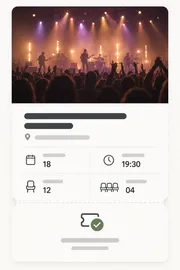
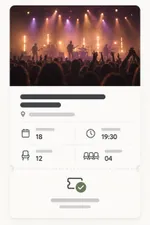
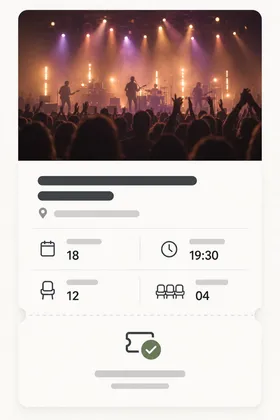
나이트 가든 라이브

이벤트1시간

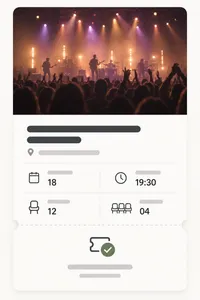
18일 토요일 하버 홀에서 열리는 나이트 가든 라이브 티켓 2장, 입장은 19:30부터.

콘서트 티켓 스크린샷

두 번째 티켓은 샘한테 물어보기

해변 여행

여행5시간

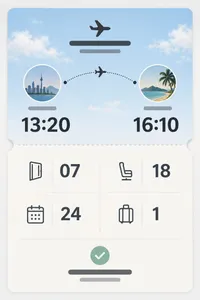
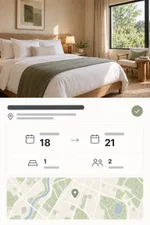
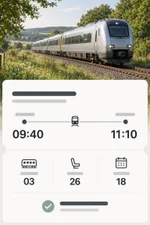
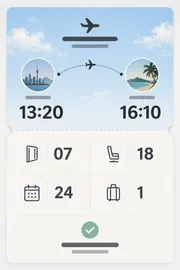
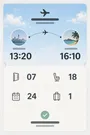
해변 여행의 항공권, 호텔, 기차표를 한 세트로 모았어요.

탑승권 스크린샷호텔 예약 스크린샷기차표 스크린샷

공유하고, 즐겨찾고, 마크업하세요.

좋은 건 즐겨찾기에 넣고, 위에 그리고, 어떤 스크린샷이든 깔끔한 이미지 카드나 스티커로 공유하세요.

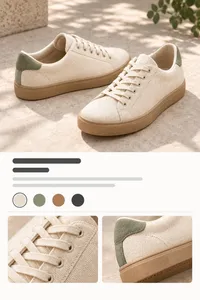
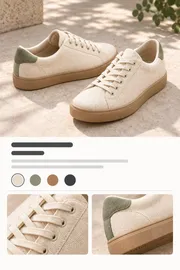
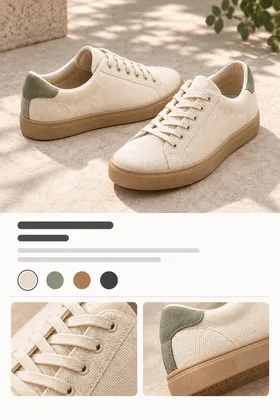
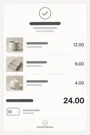
운동화 스크린샷
데일리 스니커즈

지은이 생일 선물 아이디어

미리 알림과 일정, 자동으로.

Sieva가 스크린샷 속 날짜와 마감일을 찾아서, 메모가 첨부된 미리 알림과 캘린더 일정으로 만들어 줘요.

콘서트 티켓 스크린샷

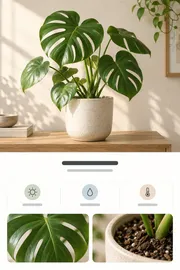
몬스테라 분갈이하기

더 큰 화분, 새 흙

10월 12일 (일) 10:00

캘린더에 추가

나이트 가든 라이브

10월 18일 (토) · 19:30 ~ 22:30

하버 홀

추가

세부 정보, 관련 스크린샷, 색상, 텍스트까지.

스크린샷을 열면 Sieva가 뽑아낸 이름, 가격, 날짜, 장소와 함께 관련 스크린샷, 색상, 모든 텍스트까지 볼 수 있어요.

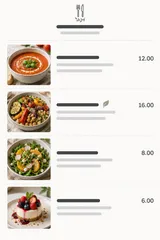
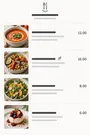
레시피 스크린샷

레몬 토마토 스파게티

  • 25분
  • 2인분
  • 레시피

정리는 저희가 도와드릴게요.

레시피는 레시피끼리, 여행은 여행끼리. Sieva가 스마트 스택으로 분류해 주고, 원하는 스택을 직접 만들 수도 있어요.

스택

내 스택

1여자끼리 주말
스택 만들기

스마트 유형

스마트3이벤트
스마트4여행
스마트2요리
스마트2목록 및 할 일
스마트3쇼핑
스마트1영수증

무엇이든 검색하세요.

친구에게 설명하듯 검색하세요. Sieva는 스크린샷에 적힌 글자만이 아니라, 그게 무엇인지 알아요.

카메라 롤을 정리하세요.

중요한 부분을 저장했다면, 직접 검토한 묶음 단위로 사진 앱에서 원본을 정리하세요. 허락 없이 사라지는 건 없어요.

최근 항목항목 16개항목 9개

베타 써 보기

Sieva는 Apple의 베타 앱인 TestFlight에서 테스트할 수 있어요. iOS 27이 설치된 iPhone이 필요해요.

TestFlight에서 참여하기

iPhone에서 이 페이지를 열거나, TestFlight를 먼저 설치한 다음 거기서 링크를 탭하세요.

자주 묻는 질문

Sieva는 어떤 앱인가요?

Sieva는 iPhone(그리고 iPad와 Mac)용 스크린샷 정리 앱이에요.

스크린샷을 읽고 ‘왜’ 저장했는지 알아내려고 하면서, 이름, 가격, 날짜, 장소, 물건처럼 쓸모 있는 정보를 챙겨 둬요.

그래서 기억나는 대로 무엇이든 찾을 수 있어요.

Sieva는 AI를 사용하나요?

네, 정확히는 Apple 기기에서 바로 돌아가는 Apple Intelligence를 써요.

외부 AI 회사도, 계정도 없어요.

스크린샷을 제3자가 읽는 일도, 무언가를 학습시키거나 광고 타기팅에 쓰이는 일도 없어요.

Sieva는 어떤 기기에서 쓸 수 있나요?

iOS 27이 설치된 iPhone이라면 모두 쓸 수 있어요. iPhone 앱은 2026년 10월에 출시돼요.

iPad, iPhone Duo, Mac은 올가을에 이어서 나와요.

Apple Intelligence를 지원하는 기기에서 가장 잘 작동해요. 이전 iPhone에서는 사용 가능한 지역이라면, 직접 켰을 때 Apple의 Private Cloud Compute를 쓸 수 있어요.

스크린샷이 어딘가에 업로드되나요?

본인의 iCloud에만 올라가요. 저희는 스크린샷이나 앱 데이터를 볼 수도, 접근할 수도 없어요.

Private Cloud Compute를 켜면 Apple 서버가 스크린샷 읽는 걸 돕고, 그 뒤에는 아무것도 보관하지 않아요.

계정이 필요한가요?

아니요, 필요 없어요. 가입도 로그인도 없어요.

iPhone과 본인의 iCloud만 있으면 돼요.

Sieva는 얼마인가요?

월간 또는 연간 구독이고, 무료 체험으로 시작해요.

연간 요금제로 하면 한 달에 미화 3달러가 조금 넘어요.

가격은 국가마다 달라요. App Store에서 현지 가격을 확인해 보세요.

Sieva가 사진 보관함에서 스크린샷을 없애나요?

요청할 때만 그래요.

정리한 스크린샷은 그때부터 Sieva 안에 보관돼요.

Sieva는 사진 앱에서 검색하는 것과 무엇이 다른가요?

사진 앱은 스크린샷 속 글자와 몇 가지 종류의 사물을 찾아요.

Sieva는 그게 무엇인지 알아내고, ‘왜 저장했을까’까지 물어보려고 해요. 레시피, 항공편, 나중에 살 신발 같은 것들요.

Sieva는 여러 기기 간에 동기화되나요?

네, 본인의 iCloud를 통해 동기화돼요.

올가을 나오는 iPad 앱과 Mac 앱도 같은 보관함을 써요. 지금 iPhone으로 시작하면 Mac이나 iPad 앱이 스크린샷, 스택, 그 밖의 데이터를 모두 그대로 이어받아요.

Sieva는 어떤 언어와 국가를 지원하나요?

최대한 많이요!

Sieva는 Apple Intelligence가 지원하는 약 17개 언어로 시작해요.

출시할 때 App Store 페이지에 모든 국가를 안내할게요.

Sieva를 미리 써 볼 수 있나요?

네, 베타는 TestFlight에서 누구나 참여할 수 있어요.

iPhone에서 이 페이지의 ‘베타 써 보기’를 탭하세요. iOS 27이 필요해요.

Sieva는 누가 만드나요?

Primary Vector예요. 시애틀에 있는 2인조 작은 팀이에요. 수십 년 동안 큰 회사에서 앱과 소비자 경험을 만들어 오다가, 우리 자신을 위해 일하면서 세상에 있었으면 하는 앱을 직접 만들기로 했어요.

Privacy Policy

Effective date: October 1, 2026

Sieva is built so that your screenshots, and everything Sieva learns from them, stay yours. They live on your device and, if you choose, in your own iCloud account. We cannot see them, or any personally identifiable data about you. This policy explains the small amount of information we do handle, and how to turn off the one optional piece.

Sieva is still in development. This policy covers this website today and the app as it will ship; we will update it if anything changes before launch.

Your screenshots and what Sieva extracts from them

Sieva reads screenshots you choose to import, pulls out text and details, and organizes them. That processing happens on your iPhone. The images, the extracted text and fields, your notes, reminders, stacks, and search history are stored on your device or in your personal iCloud account, which we have no access to. They are never sent to us.

On iPhone, Automatic uses Apple’s Private Cloud Compute when available, sending screenshots, your searches and questions, and relevant text to Apple for private processing. It falls back to on-device processing. Choose Built-in Brain in Settings to keep analysis on your iPhone. Private Cloud runs under Apple’s privacy terms. We do not receive anything from it. Apple describes the guarantees Private Cloud Compute makes about user data in its security research post:

We designed Private Cloud Compute to make several guarantees about the way it handles user data:

  • A user’s device sends data to PCC for the sole, exclusive purpose of fulfilling the user’s inference request. PCC uses that data only to perform the operations requested by the user.
  • User data stays on the PCC nodes that are processing the request only until the response is returned. PCC deletes the user’s data after fulfilling the request, and no user data is retained in any form after the response is returned.
  • User data is never available to Apple — even to staff with administrative access to the production service or hardware.

Source: Apple Security Engineering and Architecture, “Private Cloud Compute: A new frontier for AI privacy in the cloud.”

Information we do not collect

Personal information. Sieva has no accounts. The app never asks for your name, email address, or any other personal detail.

Your content. No screenshots, extracted text, notes, search terms, or locations leave your device to reach us.

Ads or third-party tracking. Sieva contains no ads and no advertising or tracking SDKs.

Third-party analytics. The app uses no outside analytics or crash-reporting service. See the next section for what we do collect ourselves, and “The waitlist on this website” for the website.

Anonymous usage and performance metrics via MetricKit

To understand how Sieva performs in the real world and which parts of it people actually use, the app can send us anonymous metrics collected with Apple’s MetricKit framework, the same privacy-preserving system iOS uses to report app performance. You choose whether to share them when you first install the app, and you can change that choice at any time in Settings inside Sieva.

What the metrics contain:

  • Counts and durations: which screens you use and for how long, how long processing takes, how often features are used, and how big your library is. Anything that could be revealing is reported as a broad bucket rather than an exact number. For example:
    • Library size is one of 0, 1–99, 100–999, 1,000–9,999, or 10,000+.
    • Cleanup batch sizes are bucketed the same way.
    • Private Cloud usage is a band such as “ok”, “approaching limit”, or “limit reached”, never a request count tied to you.
  • Performance and stability: launch time, hangs, memory, and crash diagnostics, attributed to which screen or task was active.
  • Device model, iOS version, app version, language, App Store country, which plan you’re on, and a random install identifier.

What they never contain:

  • Screenshots, extracted text or fields, notes, search terms, or the names of anything you created.
  • Your name, email, Apple ID, iCloud identifiers, or hardware identifiers.
  • Your location, IP address, or any other network identifier.
  • Any other metadata that could be used to personally identify you.

The install identifier is a random number created when Sieva is first installed. It is not linked to you or your device, and it is deleted when you turn metrics off; turning them back on creates a new one. Metrics are sent to servers we operate on Cloudflare and are used only to fix bugs and improve the app. They are not shared or sold.

Crash reports through Apple

Separately, if you have opted in to sharing analytics with app developers in iOS Settings under Privacy & Security, Apple may send us standard crash and diagnostic reports for Sieva. These contain no personal information or device identifiers. You can turn that off in the same iOS setting.

Photos access

Sieva asks for access to your Photos library only to import the screenshots you select, and later, if you choose, to delete the originals it has already saved. Deletion never happens silently: you review each batch, confirm it, and the items go to Recently Deleted in Photos where they can be recovered for 30 days.

iCloud

Sieva uses iCloud for syncing, with all synced data securely stored in your iCloud account. Sync is optional, it uses your own private iCloud database, and we cannot read what is in it.

The waitlist on this website

If you join the waitlist we store your first name, your email address, whether you ticked the beta-testing box, and when you signed up. We use that to send one email when Sieva launches and, if you asked, TestFlight invitations. We don’t sell it, share it, or add you to anything else. To be removed, reply to any email we send or write to us at the address below and we will delete the record.

To see how many people visit and how they found us, this website may use privacy-first web analytics, such as Cloudflare Web Analytics. If it does, it only counts visits: the page, the site that linked to it, your country, and your browser and device type, reported to us in aggregate. It sets no cookies, stores nothing on your device, does not fingerprint you, and does not follow you to other sites. We will never use advertising or cross-site tracking on this website. The website is served by Cloudflare, which keeps the ordinary short-lived request logs any host does.

Support requests

If you contact us through the support form, we store your first name, email address, the topic, your message, and any device details or screenshots you choose to add. We keep them in our own database on Cloudflare and file them in Linear, the issue tracker we use to answer and follow up; screenshots are stored in Linear only. We use them to reply and to fix what you report, nothing else. To have a request removed, write to us at the address below.

When you write from inside the app with usage sharing on, the form offers to include your install identifier, checked by default. If you leave it checked, we can look up the usage and crash reports from your install to help with your request, which links those reports to your email for that purpose. Uncheck it and the identifier is not sent.

The form uses Cloudflare Turnstile to keep out bots. It checks your browser without cookies for tracking or advertising and without asking you to solve puzzles; see Cloudflare’s Turnstile privacy addendum.

Videos on this website

Some guides include videos hosted on YouTube. Until you press play, a video is only a picture served from sieva.app, and your browser does not contact YouTube or Google. When you press play, the video loads from YouTube’s privacy-enhanced mode (youtube-nocookie.com), andGoogle’s privacy policy applies to it.

Data storage and security

Everything Sieva creates is stored on your device and, when sync is on, in your iCloud account. Files on the device are protected by iOS data protection. See Apple’s Privacy Policy for details on how iCloud handles data.

Third-party services

Sieva does not integrate with or share data with third-party services, apart from Apple’s App Store for purchases. When you buy a subscription or unlock, we receive confirmation of the purchase from Apple, not your payment details. If you email us or use the support form, we use your details only to reply, as described under Support requests.

Children’s privacy

Sieva does not knowingly collect personal information from anyone, including children under 13. The anonymous metrics described above contain nothing that identifies a person.

Changes to this policy

We may update this policy to reflect changes in the app or for legal or operational reasons. Updates are posted on this page with a new effective date.

Contact

Questions about this policy or your privacy: Privacy Officer, privacy@primaryvector.com.

Terms of Service

Open as a page

Terms of Service

Last updated: September 24, 2026

These Terms of Service govern your use of Sieva, the website at sieva.app, and any related services provided by Primary Vector Inc. (“we”, “us”).

By downloading or using Sieva, you agree to these Terms of Service and to comply with all applicable laws and regulations. If you do not agree with them, do not use the app or our other services.

If you download Sieva from the Apple App Store, you also agree to the Usage Rules in the App Store Terms of Service, and Apple’s Licensed Application End User License Agreement applies to your use of the app alongside these terms. Where the two conflict, Apple’s agreement governs.

We may review and amend these Terms of Service at any time. When we do, we will update this page and the date above. Changes take effect when they are published.

Subscriptions and free trials

Sieva is a paid app. Full access requires an auto-renewing subscription, offered monthly or yearly, bought through the App Store. Prices are shown in the App Store before you buy and vary by country.

  • Payment is charged to your Apple Account when you confirm the purchase.
  • A subscription renews automatically at the end of each period unless you cancel it at least 24 hours before the period ends. Your account is charged for the renewal within the 24 hours before the period ends.
  • If a free trial is offered, the subscription starts and is charged when the trial ends unless you cancel before then. Any unused part of a trial ends when you buy a subscription.
  • You can manage or cancel your subscription in your Apple Account settings. Canceling stops future renewals; you keep access until the end of the period you paid for.
  • Purchases are processed by Apple. Refunds are handled by Apple under its policies; we cannot issue them directly.

Your content

Your screenshots, the details Sieva extracts from them, and your notes, stacks, and reminders are yours. Sieva stores them on your device and, if you turn on sync, in your own iCloud account. We do not receive, own, or have access to them. You are responsible for having the right to keep and use the images you import.

Sieva has no accounts on our servers. The anonymous usage metrics the app can send, which you can turn off at any time, are described in our Privacy Policy.

Cleaning up your Photos library

Sieva can remove original screenshots from your Photos library after it has saved them. This only happens when you review a batch and confirm it. Removed items go to Recently Deleted in Photos, where Photos keeps them for about 30 days before removing them permanently. Please review each batch before confirming; once Photos permanently removes an item, neither we nor Sieva can recover it.

Extracted details and suggestions

Sieva reads screenshots automatically, preferring Apple’s Private Cloud Compute on iPhone with on-device fallback. Built-in Brain keeps analysis on your device. The text, names, prices, dates, places, stacks, reminders, and calendar events it suggests may be incomplete or wrong. Check anything important, such as a travel time, a price, or a deadline, against the original screenshot or its source before you rely on it.

Private Cloud Compute is provided by Apple, requires internet, has a daily usage allowance, and is subject to Apple’s terms and privacy policy.

Beta versions

Pre-release versions of Sieva distributed through TestFlight are unfinished. They may contain bugs, change without notice, or lose data, and are provided for testing only.

Limitations of use

By using Sieva, you agree that you will not:

  • Modify, copy, prepare derivative works of, decompile, or reverse engineer Sieva or any software contained within the app.
  • Remove any copyright or other proprietary notices from Sieva or its materials.
  • Transfer Sieva or its associated materials to another person or “mirror” the materials on any other server.
  • Use Sieva in a way that abuses or disrupts our networks or any other service provided by Primary Vector Inc.
  • Use Sieva to store or share material that is unlawful or that you have no right to use.
  • Use Sieva in violation of any applicable laws or regulations.
  • Attempt to access, modify, or interfere with any part of the app’s code or functionality.

Intellectual property

The intellectual property in Sieva is owned by or licensed to Primary Vector Inc. You are granted a limited, non-exclusive, non-transferable license to use Sieva on devices you own or control, for personal use. This license does not transfer ownership and may be revoked if these Terms of Service are violated.

Liability

Sieva is provided on an “as is” basis. To the extent permitted by law, Primary Vector Inc. makes no warranties, expressed or implied, and disclaims all other warranties including, but not limited to, implied warranties of merchantability, fitness for a particular purpose, or non-infringement of intellectual property.

To the extent permitted by law, Primary Vector Inc. is not liable for any loss or damages resulting from the use of Sieva, including but not limited to loss of data, photos, revenue, or goodwill.

Links

External links on this website or in the app are not endorsed or controlled by Primary Vector Inc., and you access them at your own risk.

Right to terminate

We may suspend or terminate your right to use Sieva immediately upon written notice if you breach these Terms of Service.

Severance

If any provision of these Terms of Service is found to be unenforceable or invalid, it will be severed, and the remaining provisions will remain in effect.

Governing law

These Terms of Service are governed by and construed in accordance with the laws of Delaware (DE). You agree to submit to the exclusive jurisdiction of the courts in that state, except where the law of the country you live in gives you rights that cannot be waived.

Contact

Questions about these terms: privacy@primaryvector.com.